Loading
Need some help with installing WebAbility?
Find your answers here
Installing the WebAbility Accessibility Enhancer on Go High Level
Follow these simple steps to install the WebAbility Accessibility Enhancer on your Go High Level platform and make your website accessible for everyone.
Step 1 - Copy your Javascript code
- Sign in at app.webability.io, open Sites and select your site. Open the Settings tab. Under Installation, copy the script tag under Copy your snippet. WebAbility does not have a Go High Level marketplace app, so this script is the way to install it.
Step 2 - Open GoHighLevel dashboard
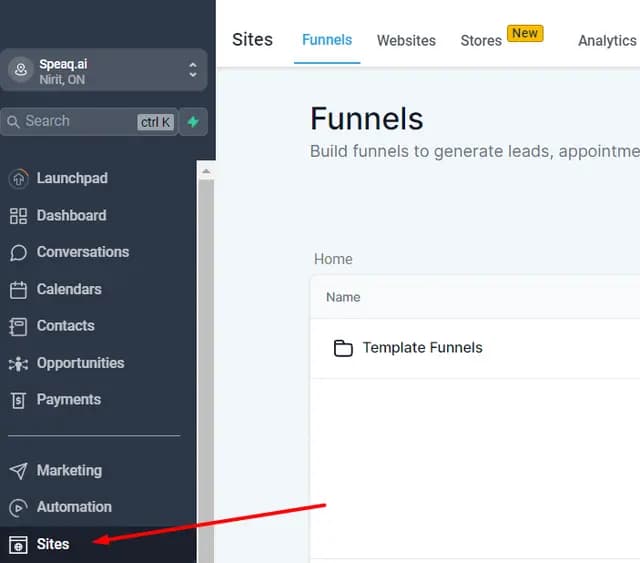
- Navigate to your GoHighLevel dashboard and click on Sites.
Step 3 - Select site
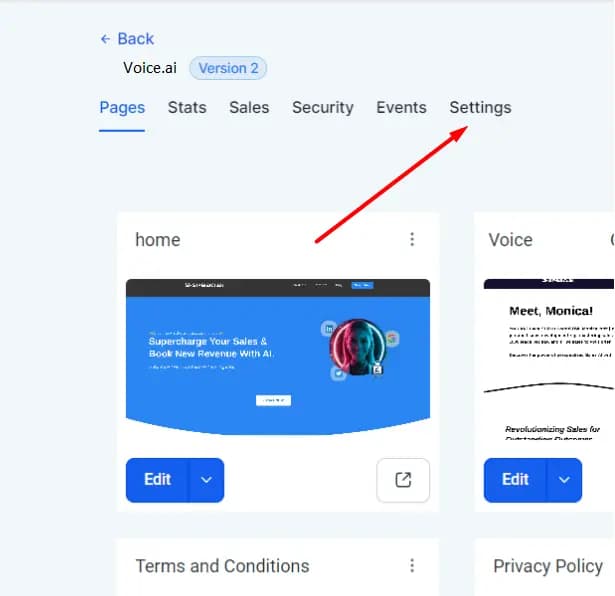
- Choose the website you wish to add WebAbility to, then click on the settings button on the top menu bar.
Step 4 - Add WebAbility Code
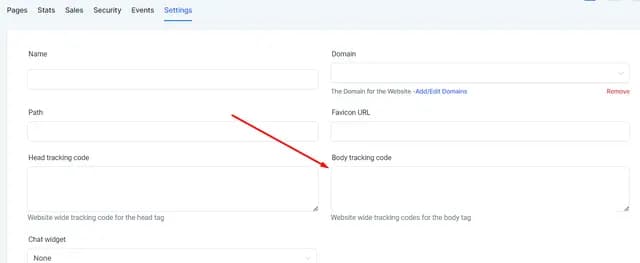
- Scroll to the Body Tracking Code section. In the empty field, paste the script tag you copied from the WebAbility dashboard.
<script src="https://enhancer.webability.io/widget.min.js" data-asw-position="bottom-left-x-20-y-20" data-asw-lang="auto" data-asw-icon-type="m-full" defer></script>This is an example. Copy your own snippet from your WebAbility dashboard: Sites, select your site, Settings tab, Installation. It has your position, language and icon settings.
Step 5 - Save Changes
- After pasting the code, click Save Changes and publish your site for the changes to take effect.
That's it! You have successfully integrated WebAbility. It is now working to make your site accessible.
Was your question answered? For further assistance, please contact our customer support team at [email protected]
Note: Whichever installation method you use, make sure to read ourWebsite Onboarding Guideand follow the instructions carefully to get the WebAbility Accessibility Enhancer set up right and running smoothly.